
You bought a Victron Energy Smart battery for your travel vehicle but haven’t installed it yet?
Here you’ll learn how to find out whether it can safely be stored a while longer or urgently needs a charge to avoid damage.
CHARGING A VICTRON ENERGY SMART BATTERY THAT ISN’T INSTALLED:
WHAT YOU NEED
Depending on your approach, you will need
- an Android or iOS smartphone with the Victron Connect app.
- a multimeter
- a regular 12V (car) battery charger
Download the Victron Connect app right here:
Checking and Assessing the Battery Voltage
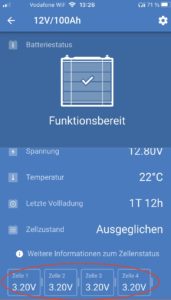
Install the app and connect to the battery or batteries.
You can now see the individual cell voltages in the app. As long as none of the cells is below 2.9V, everything is fine. If you check every few weeks, you will notice that the voltage drops only very slowly. So no need to panic at 3V.
If 2.9V is displayed, it is definitely time to think about how to do the first charge.
At 2.8V you should take care of charging NOW, and at 2.5V … it’s high time! Otherwise your battery can suffer permanent damage.
CHARGING THE BATTERY – HOW IT WORKS
The best approach is simply to install your system in your travel vehicle according to plan and charge the battery there. If that isn’t possible yet, there are two options.
Option 1:
The safest and best way is to install all the charging components provisionally according to plan. If you have a tigerexped power pro system, you can do this easily using the storage & 230V parts of the wiring diagram. You can leave out all other components, but the two parts mentioned must be installed completely.
Option 2:
With this alternative you have to keep an eye on the charging process, because you bypass the battery’s protection circuit and it can no longer protect itself from overcharging! Use a multimeter for this, which should be part of your standard installation tools anyway. If it isn’t, now is the time to get one.
For the charging itself, you can use any 12V (car) battery charger.
First, connect the charger and the multimeter to your battery. Then set the multimeter to DC voltage measurement (volts DC). It should now show roughly the same value as the voltage in the app – 12.8V in this example.
If your individual cells are down to 2.5V, your multimeter will show 10V.
Connecting the multimeter, LiFePO4 battery and charger
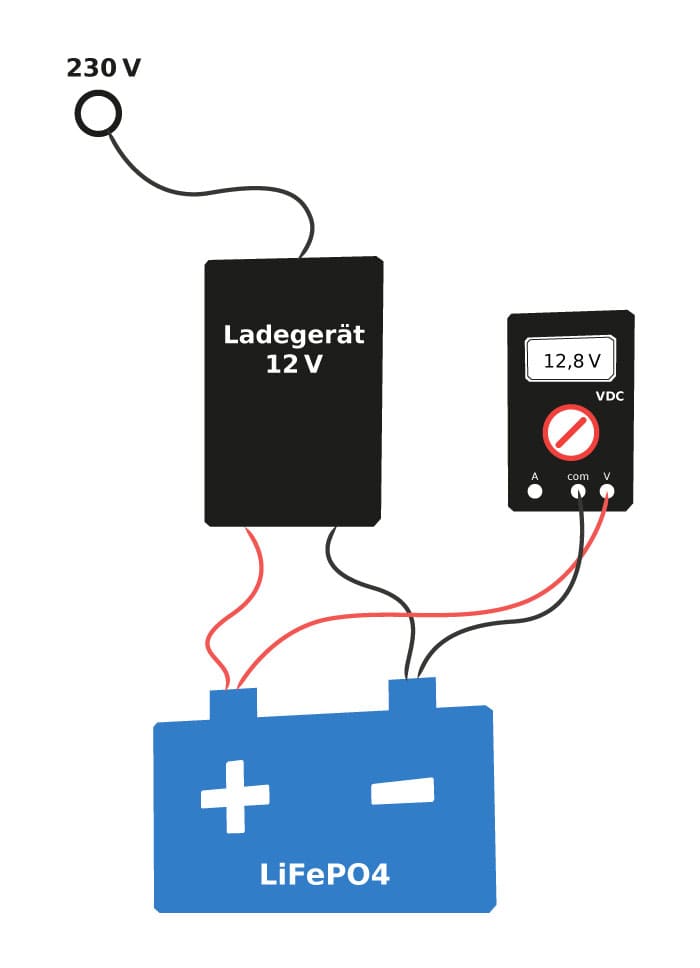
Now you can switch on the charger and watch the voltage rise (very) slowly – yes, that is exciting too, but of course we mean the voltage in volts on the multimeter.
From this point on you need to check the voltage regularly. When the voltage on the multimeter has reached about 13-13.2 volts, stop charging.
Now you can store your battery again for some time. Check the cell voltage at regular intervals and repeat the process if necessary.
Did these tips for charging Victron Energy Smart batteries help you? Pass them on to your friends!
You might also be interested in these articles: